 CardMax
How to Get Your Credit Card Annual Fee Waived
Short answer: first check whether your card waives the fee automatically once you spend a set amount in a year. If it does, track your spending against that target. If it does not, call or chat with the issuer around the renewal date and ask for a waiver or retention offer. If they say no, ask to downgrade to a no-fee card in the same family before deciding to cancel.
1. Hit a spend-based fee waiver
Many cards, especially outside the US, waive next year's annual fee when you spend a certain amount during the card year. The rules differ by card, so read the fine print for three things:
- The target amount and the period it is measured over, often the card anniversary year rather than the calendar year.
- What counts. Rent, wallet top-ups, fuel, EMI conversions and cash withdrawals are often excluded.
- When it is applied. Some cards charge the fee and then reverse it, so a posted fee does not always mean you missed.
The hard part is not the rule. It is knowing how close you are with a month to go.
2. Ask for a waiver or retention offer
If your card has no automatic waiver, ask. The best time is shortly before or just after the fee posts, since many issuers allow a window after posting to cancel and get the fee refunded. Be direct: say you are reviewing whether the card is worth keeping. A good payment history helps. The answer might be a full waiver, a partial credit, or bonus points that offset the fee.
3. Downgrade instead of cancelling
If there is no offer, ask to move ("product change") to a no-fee card from the same issuer. You usually keep the account and its age, which protects your credit history, and you keep your credit limit available.
4. Cancel, but time it well
If the card no longer earns its fee, cancel. Redeem or transfer your points first, update any subscriptions billed to it, and consider the effect of losing that credit limit on your overall utilization.
Decide with numbers
A fee is worth paying when the card's value to you is higher. Add up rewards you actually redeemed, perks you actually used, and any credits, then compare with the fee. Only count what you use, not what the card advertises.
How CardMax tracks a fee waiver
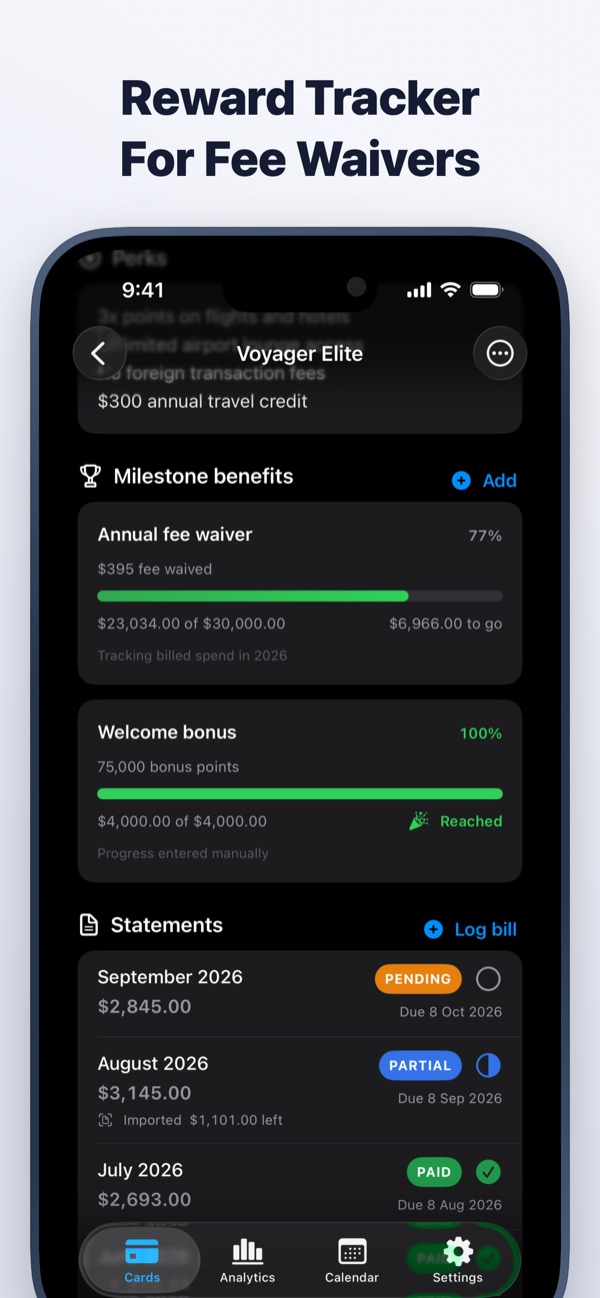
In CardMax, add a milestone to any card, such as a fee waiver or a welcome bonus, with its spending target. Progress fills in automatically from the statements you import, or you can set it by hand, and each milestone shows its own progress bar. Add the annual fee and renewal date and the app reminds you before it renews, so you have time to push for the target or call the bank.
CardMax is coming soon
All your credit cards, bill reminders, statements and spending in one private wallet for iPhone and iPad. Your data never leaves your device.
Coming soon to theApp StoreMore guides
Statement date vs due date
Two dates run every card. Learn which one sets your bill and which one costs you if you miss it.
Read guideNever miss a due date
A four-part system for tracking every card's due date, even when you juggle several.
Read guideManage multiple cards
Give every card a job, keep the dates in one place, and stop paying for cards you do not use.
Read guide