 CardMax
How to Keep Track of Credit Card Due Dates (Without Missing One)
Short answer: write down every card's statement day and due day in one place, get a reminder the day before each due date, set autopay for at least the minimum payment as a safety net, and look at all your upcoming due dates together once a week. Missed payments almost always come from dates scattered across different bank apps, not from forgetting that bills exist.
1. Build one master list
For each card, note the bank, the card name, the statement date, the due date and the annual fee date. That is all you need. A spreadsheet, a note or an app all work, as long as it is one place and not five bank apps. When you open a new card, add it that day.
2. Remind yourself twice
A single reminder on the due date is too late if a payment takes a day to clear. Two reminders work better:
- On the statement date, so you see the new bill and can check it for anything unexpected.
- The day before the due date, so there is still time to pay if you have not.
Your bank's own alerts help, but they arrive in different apps and formats. Reminders you control, in one place, are easier to trust.
3. Use autopay as a safety net, not a system
Setting autopay for the minimum payment on every card means a busy week never becomes a late fee. It is not a replacement for paying in full, because paying only the minimum still costs interest. Treat autopay as the backstop and your reminders as the real process.
4. Consider moving due dates closer together
Many issuers let you change your due date. Grouping them near payday means one sitting to pay everything. Spreading them out can suit you better if cash flow is tight. Either way, choose on purpose rather than living with whatever dates you were given.
5. Do a weekly two-minute check
Once a week, look at every due date coming up in the next ten days and mark off anything already paid. That habit catches the one card whose statement arrived by post, or whose autopay failed.
Common mistakes
- Tracking the statement date and forgetting that the due date is the one with a penalty.
- Assuming autopay ran without checking.
- Paying the minimum and thinking the card is handled.
- Forgetting a card you rarely use, which can still carry a subscription charge.
How CardMax does this for you
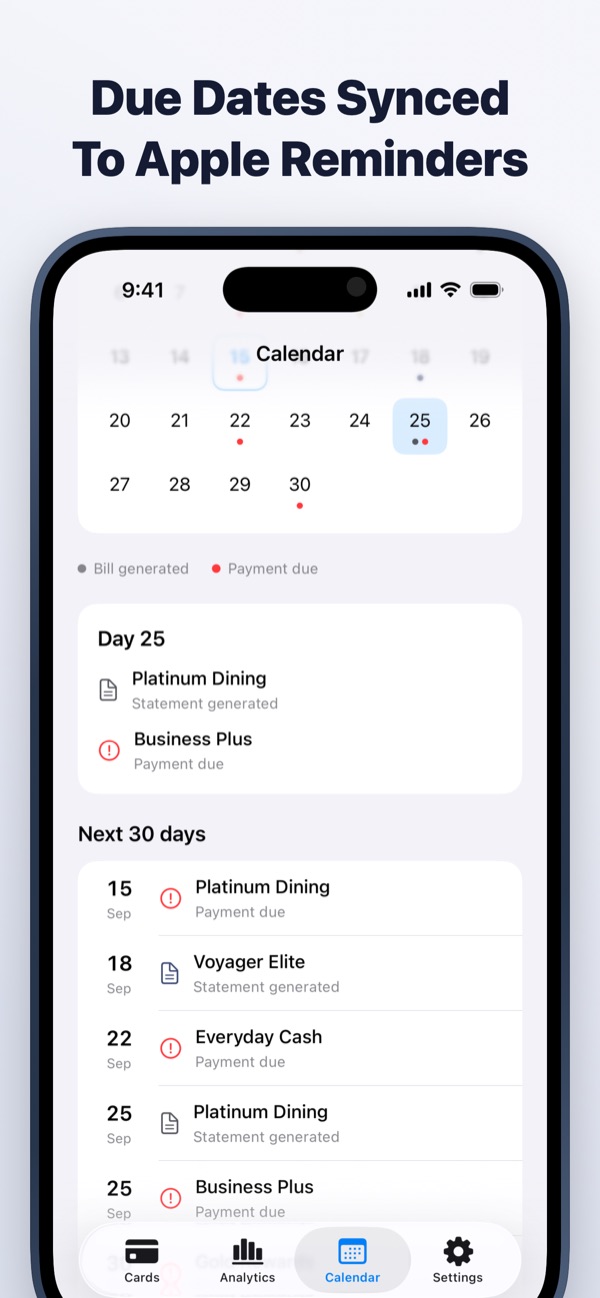
CardMax is that master list, built for credit cards. Add each card's bill day and due day and the app schedules both reminders automatically: one when the statement is generated, one the day before payment is due. Record a payment and the next reminder knows whether the bill is paid, partly paid or still open. The Calendar tab shows the next 30 days across every card, and one switch syncs everything to Apple Reminders. It all runs on your device, with no bank login.
CardMax is coming soon
All your credit cards, bill reminders, statements and spending in one private wallet for iPhone and iPad. Your data never leaves your device.
Coming soon to theApp StoreMore guides
Statement date vs due date
Two dates run every card. Learn which one sets your bill and which one costs you if you miss it.
Read guideManage multiple cards
Give every card a job, keep the dates in one place, and stop paying for cards you do not use.
Read guideGet your annual fee waived
Hit the spending target, ask at the right moment, or downgrade. Here is how each route works.
Read guide