 CardMax
How to Manage Multiple Credit Cards: A Practical System
Short answer: give each card one job (travel, groceries, fuel, a fee waiver target), keep all of their dates, fees and reward rules in one place, pay every statement in full, and review each card once a year against what it costs you. Having several cards is not the problem. Losing track of them is.
Give every card a job
Most people with several cards use them randomly and miss the rewards they signed up for. Decide what each card is for. For example: one card for travel and dining, one for groceries, one for fuel, and one kept for a spending target. Then use the right card for the right purchase without thinking about it.
Keep one record of every card
For each card you want these at a glance:
- Statement date and payment due date
- Credit limit
- Annual fee and when it renews
- Reward rules, perks and any spending milestones
- What category of spending it is for
The point is one view across all cards, instead of logging into each bank separately.
Pay every statement in full
Rewards are rarely worth more than interest. A single card carrying a balance can wipe out a year of points from all the others. If you cannot pay everything in full, focus on the card with the highest interest rate first, and stop using rewards as a reason to spend.
Watch utilization across cards
Credit scoring looks at how much of your available credit you use, both per card and overall. Spreading spending across cards and paying down balances before statement dates keeps that ratio low. Keeping older cards open usually helps too, as long as they do not charge a fee you are not earning back.
Review each card once a year
Before an annual fee renews, ask whether the card earned more than it cost. If not, you can ask the issuer to waive the fee, move to a no-fee version of the card, or close it. Put the renewal date in your calendar a month ahead, so you decide instead of paying by default.
Keep security simple
- Turn on transaction alerts in each bank's app.
- Never keep card numbers in unencrypted notes or photos.
- Freeze or lock cards you only use occasionally, if your bank supports it.
How CardMax organises multiple cards
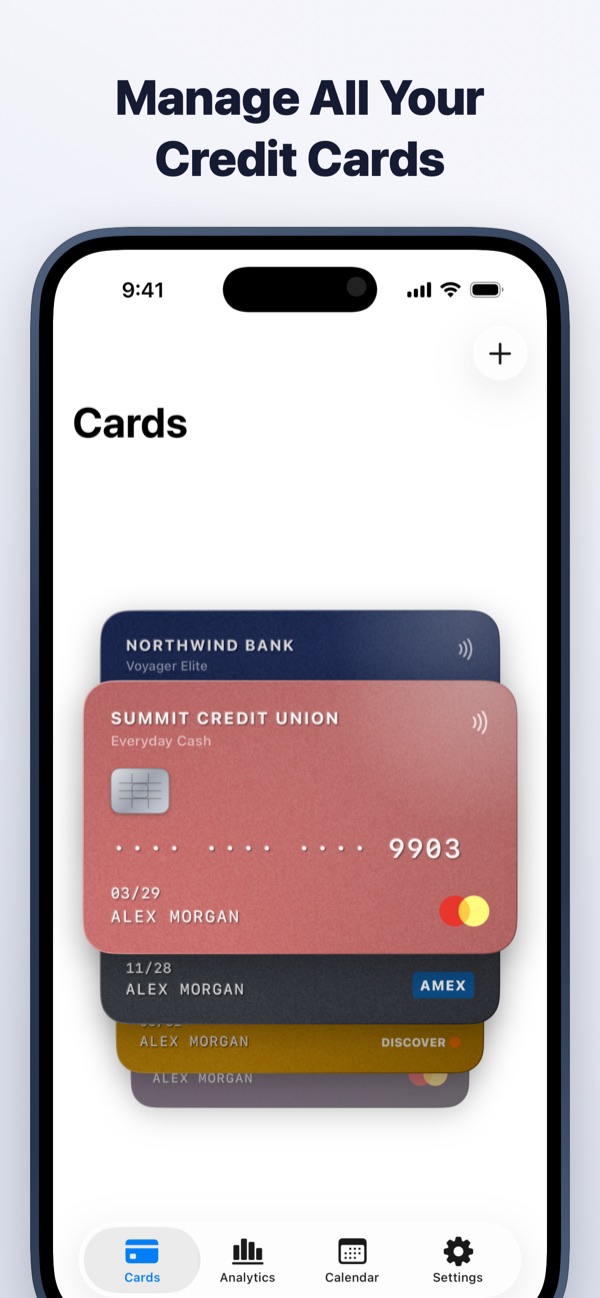
CardMax puts every card in one wallet you can flick through. Each card holds its category, perks, credit limit, annual fee and renewal date, bill day and due day, with reminders for all of them. Import statements to see spending per card in clear monthly charts, and track milestone rewards like fee waivers with a progress bar. Card numbers are encrypted and never leave your device.
CardMax is coming soon
All your credit cards, bill reminders, statements and spending in one private wallet for iPhone and iPad. Your data never leaves your device.
Coming soon to theApp StoreMore guides
Statement date vs due date
Two dates run every card. Learn which one sets your bill and which one costs you if you miss it.
Read guideNever miss a due date
A four-part system for tracking every card's due date, even when you juggle several.
Read guideGet your annual fee waived
Hit the spending target, ask at the right moment, or downgrade. Here is how each route works.
Read guide