 CardMax
Is It Safe to Store Credit Card Info on Your Phone?
Short answer: yes, if the details are encrypted, locked behind Face ID, Touch ID or a passcode, and not uploaded to a server that could be breached. The unsafe places are the common ones: a photo of the card, a plain note, a screenshot or a message to yourself.
Where card details end up, compared
| Where | How safe | Why |
|---|---|---|
| Apple Wallet (Apple Pay) | Very safe | Stores a device-specific token, not your real card number, and every payment needs Face ID, Touch ID or your passcode. It is for paying, not for viewing your full details. |
| Password manager | Safe | Encrypted and locked. Usually synced to the cloud, which is convenient but means an account to protect. |
| Encrypted card wallet app | Safe, if built well | Check that numbers are encrypted, the app locks itself, and nothing is uploaded. |
| Notes app, plain note | Risky | Readable by anyone with your unlocked phone, and synced wherever your notes go. |
| Photo or screenshot of a card | Risky | Sits in your photo library, backs up to the cloud, and is easy to share by mistake. |
What actually protects you
- Encryption at rest. Card numbers and CVVs should be encrypted before they are saved, with a strong standard such as AES-256.
- A key that stays on the device. On iPhone, the Keychain can hold a key that is never synced or backed up, so a copy of your data is useless elsewhere.
- An app lock. The app should lock when you leave it and ask for Face ID, Touch ID or a PIN to show full numbers.
- No account, no server. Data that is never uploaded cannot be leaked in a breach.
- Careful copying. A copied card number should expire from the clipboard and not sync to your other devices.
Protect the phone itself
- Use a six-digit or alphanumeric passcode, not four digits.
- Keep Face ID or Touch ID on and iOS up to date.
- Turn on Find My, so a lost phone can be locked or erased.
- Consider Stolen Device Protection in the iOS Settings app.
Should you store the CVV?
Merchants are not allowed to keep it, but you can, for your own use. If you do, it should get the same encryption and lock as the card number. If an app treats the CVV like any other text field, do not put it there.
How CardMax protects your cards
CardMax encrypts card numbers, CVVs and security codes with AES-256-GCM before they are saved. The key is created on your device and kept in the Keychain as device-only, so it never syncs or backs up. The app locks whenever it goes to the background, full numbers need Face ID or your PIN and hide again automatically, and a copied card number clears from the clipboard after 60 seconds. There is no account, no server and no analytics. It also works in airplane mode.
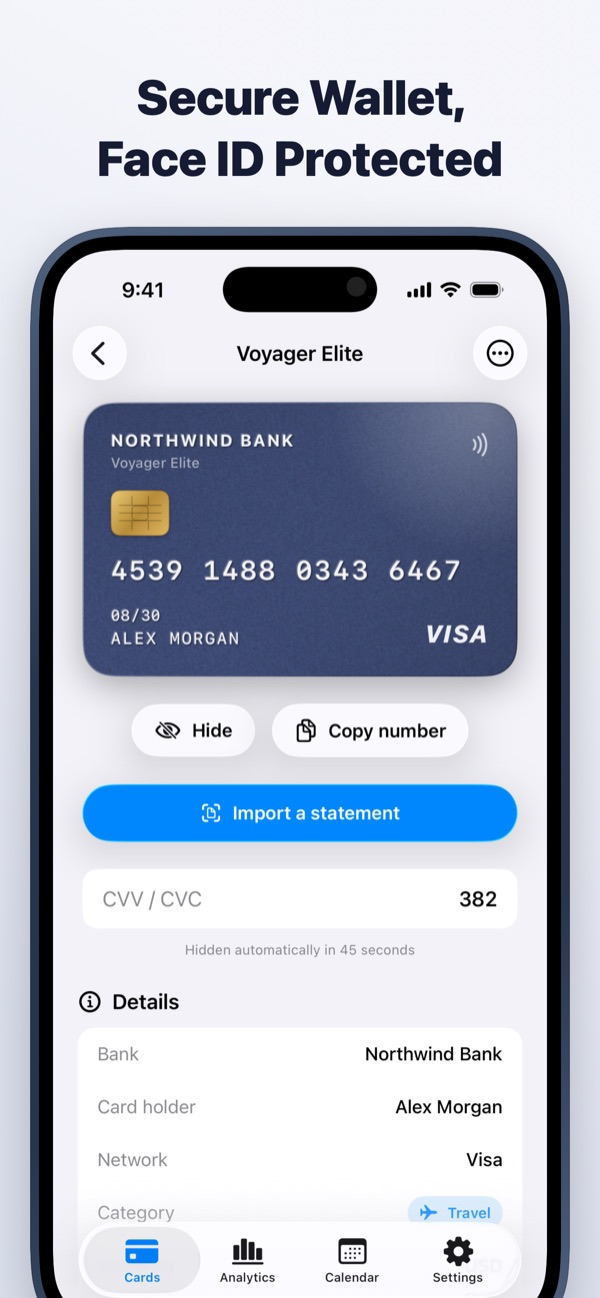
CardMax is coming soon
All your credit cards, bill reminders, statements and spending in one private wallet for iPhone and iPad. Your data never leaves your device.
Coming soon to theApp StoreMore guides
Statement date vs due date
Two dates run every card. Learn which one sets your bill and which one costs you if you miss it.
Read guideNever miss a due date
A four-part system for tracking every card's due date, even when you juggle several.
Read guideManage multiple cards
Give every card a job, keep the dates in one place, and stop paying for cards you do not use.
Read guide